

The short version
This is a tutorial for building onchain with Claude Code, Cursor, or Codex. You connect the agent to live chain data, then use that connection to read a wallet, check a token, or ship a small app.
All three clients share one Tatum MCP server. The config file is the part that changes.
The skill left for you is the question. Where did the money come from? Who holds the admin keys? What can the deployer do after launch?
What the agent needs
Two things. A coding agent, and a chain connection that does not guess at commands.
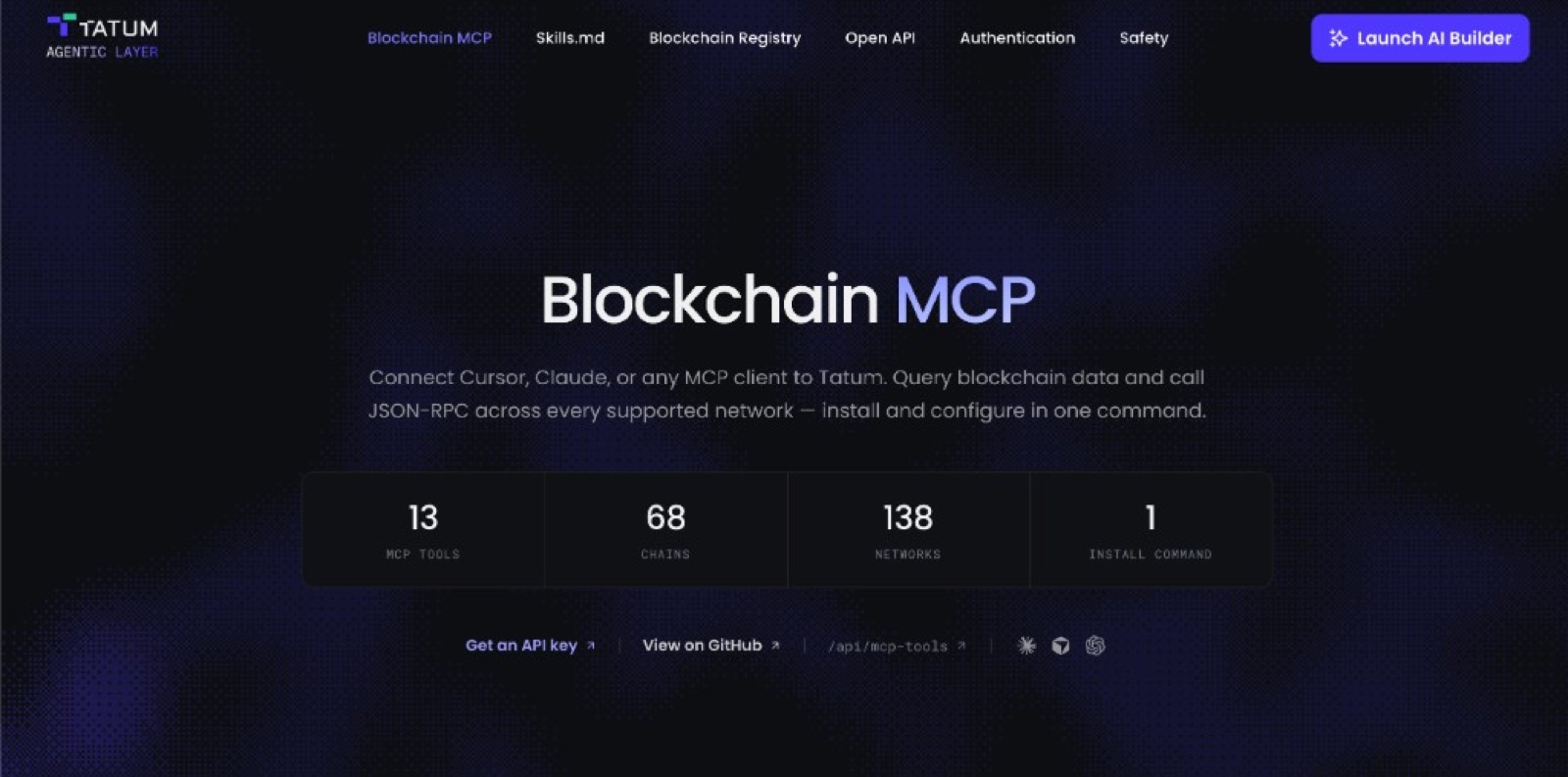
The connection is the Tatum Blockchain MCP server. It exposes 13 tools across 68 chains and 138 networks: wallets, tokens, NFTs, rates, a malicious-address check, and raw JSON-RPC. One API key covers the Data API at api.tatum.io and a gateway URL such as ethereum-mainnet.gateway.tatum.io.
Claude Code and Cursor share a JSON shape. Codex wants TOML. The tools they call are identical.
Step 1. Create an API key
Open the Tatum dashboard and create a key. A free account is enough to start reading mainnet.
Keep it in an environment variable named TATUM_API_KEY. Do not paste the key into a chat, and do not commit it. The auth guide shows where the key belongs for MCP, a backend, and CI. Every request sends it as the x-api-key header. One key works in all three clients.
Step 2. Install the MCP server
You need Node 18 or newer. Install once. Codex, Claude Code, and Cursor all launch the same package.
npm install -g @tatumio/blockchain-mcpThe package is @tatumio/blockchain-mcp. Source is on GitHub.
How to add an MCP server to Claude Code
Claude Code is the client most people mean when they search for a Claude Code MCP setup. Add the server for your user, so every project can see the tools:
claude mcp add --env TATUM_API_KEY=YOUR_API_KEY --transport stdio --scope user tatumio -- npx -y @tatumio/blockchain-mcpQuit Claude Code and open it again. Run /mcp. If the server is waiting on approval, approve it there. A connected server lists the Tatum tools. A failed one usually means the key did not land in the environment, or npx could not start.
Want the config in a file? Claude Code and Cursor share this JSON. Claude Code reads it from .mcp.json at the project root:
{
  "mcpServers": {
    "tatumio": {
      "command": "npx",
      "args": ["-y", "@tatumio/blockchain-mcp"],
      "env": {
        "TATUM_API_KEY": "YOUR_API_KEY"
      }
    }
  }
}
The MCP page labels this file .claude/mcp.json. Claude Code loads .mcp.json from the repository root. Save it there, restart the session, and approve the server in /mcp if asked. Project servers are the ones you can commit (with the key left as a placeholder, filled from the environment on each machine).
How to add an MCP server in Cursor
Cursor MCP uses the same JSON as Claude Code. The path is the only change.
For one repo, save that block as .cursor/mcp.json. For every project on your machine, save it as ~/.cursor/mcp.json.
Open Cursor Settings, then MCP. The tatumio server should be listed. Turn it on if the toggle is off. If the tool count stays at zero, restart Cursor. In the composer, ask for a wallet balance and watch the tool trace. Cursor will not invent get_wallet_portfolio once that server is green.
How to add an MCP server to Codex
OpenAI Codex does not read mcp.json. Codex MCP config is TOML, in ~/.codex/config.toml. The ChatGPT desktop app, the Codex CLI, and the IDE extension share that file, so you set it up once.
Fastest path, the CLI writes the table for you:
codex mcp add tatumio --env TATUM_API_KEY=YOUR_API_KEY -- npx -y @tatumio/blockchain-mcpOr paste this yourself. The table key is mcp_servers, with an underscore:
[mcp_servers.tatumio]
command = "npx"
args = ["-y", "@tatumio/blockchain-mcp"]

[mcp_servers.tatumio.env]
TATUM_API_KEY = "YOUR_API_KEY"
A project-scoped copy lives at .codex/config.toml, and only in a trusted project. In the Codex TUI, /mcp lists the server. codex mcp list does the same from a shell. A JSON block pasted into config.toml is ignored. Retype it as TOML if the tools never appear.
Codex vs Claude Code vs Cursor
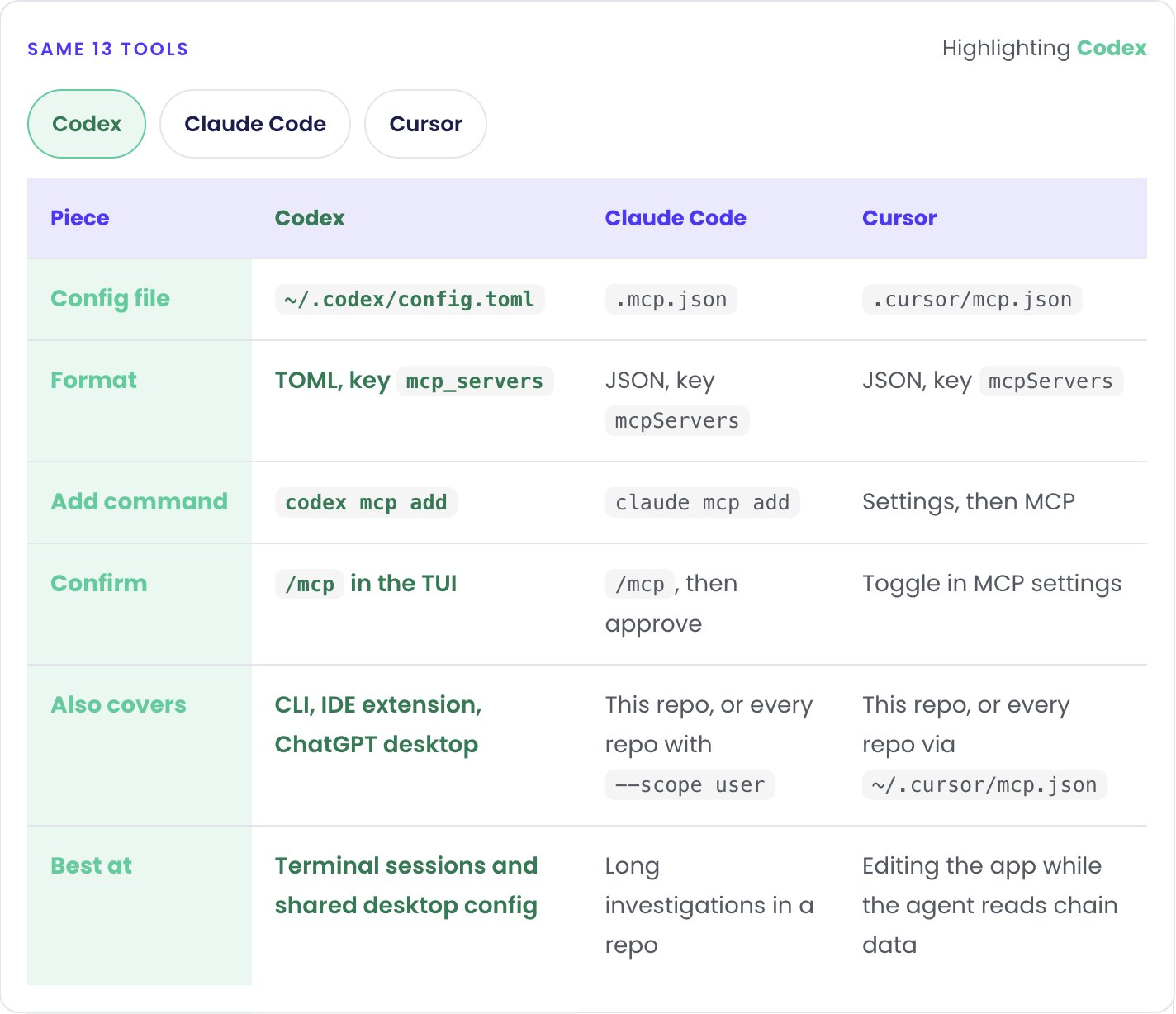
People search Codex vs Claude Code, Claude Code vs Cursor, and Cursor vs Codex when they are picking a coding agent. For chain data, the tools do not change. The config file does.
Codex MCP is TOML. One file, ~/.codex/config.toml, covers the Codex CLI, the IDE extension, and the ChatGPT desktop app. Claude Code MCP is JSON in .mcp.json, and you approve the server with /mcp. Cursor MCP is that same JSON, saved as .cursor/mcp.json, then switched on under Settings, then MCP.
Pick Codex for a terminal session and one config across ChatGPT. Pick Claude Code for a long investigation inside a repo. Pick Cursor when the agent should read balances in the same window where you edit the app.
Click a client to hold the column. Otherwise the highlight walks the row so you can see what actually changes.
Same 13 tools
Highlighting Claude Code
| Piece | Codex | Claude Code | Cursor |
|---|---|---|---|
| Config file | ~/.codex/config.toml |
.mcp.json |
.cursor/mcp.json |
| Format | TOML, key mcp_servers |
JSON, key mcpServers |
JSON, key mcpServers |
| Add command | codex mcp add |
claude mcp add |
Settings, then MCP |
| Confirm | /mcp in the TUI |
/mcp, then approve |
Toggle in MCP settings |
| Also covers | CLI, IDE extension, ChatGPT desktop | This repo, or every repo with --scope user |
This repo, or every repo via ~/.cursor/mcp.json |
| Best at | Terminal sessions and shared desktop config | Long investigations in a repo | Editing the app while the agent reads chain data |
Prove the endpoint answers
Before a hard question, make one boring call succeed. The gateway is one URL per network. The method is whatever JSON-RPC that chain already speaks.
curl --request POST \
  --url 'https://ethereum-mainnet.gateway.tatum.io/' \
  --header 'content-type: application/json' \
  --header 'x-api-key: YOUR_API_KEY' \
  --data '{"jsonrpc":"2.0","id":1,"method":"eth_blockNumber","params":[]}'
On 29 September 2026 that call returned 0x18dfcab. Block 26,082,475. Same header, same key, different host for another network: base-mainnet.gateway.tatum.io, polygon-mainnet.gateway.tatum.io, solana-mainnet.gateway.tatum.io, bsc-mainnet.gateway.tatum.io. The live list, including URLs, is the chain registry.
When you want a portfolio instead of a raw hex balance, use the Data API. Query param is addresses (plural), and tokenTypes is required: native, fungible, or nft,multitoken.
curl -s \
  -H "x-api-key: $TATUM_API_KEY" \
  "https://api.tatum.io/v4/data/wallet/portfolio?chain=ethereum-mainnet&addresses=0xd8dA6BF26964aF9D7eEd9e03E53415D37aA96045&tokenTypes=native"
That address is public. On the same day the native row came back at about 5.72 ETH, with chain, decimals, and type filled in. Portfolio coverage is a defined set of chains (Ethereum, Base, Polygon, Solana, and the rest in the wallet docs). The gateway is wider. If a portfolio call comes back empty, check the chain slug before you decide the wallet is empty.
Ask one question
Paste this into Codex, Claude Code, or Cursor. It is small on purpose.
Using the Tatum MCP server, read the native balance of 0xd8dA6BF26964aF9D7eEd9e03E53415D37aA96045 on ethereum-mainnet. Then call eth_blockNumber on the same chain through the gateway. Cite the tool you used and the block number you read. Do not sign or send a transaction.The trace should show get_wallet_portfolio and gateway_execute_rpc. If the agent writes a curl and never runs it, tell it to call the tool and quote the response.
What a real investigation asks
The same four questions work on every token you will look at.
- Where did the money come from? Trace the deployer wallet backward. A fresh wallet funded from an exchange is ordinary. A wallet funded through a mixer or a privacy pool is a signal, and the trail may stop there. Say so.
- Who holds the admin keys, and what can they do? Read the contract. List minting, pausing, upgrading, fee changes, and blacklists.
- Did insiders move before the public could? Rebuild the first minutes from transfer history. Deployer buys, wallets funded from the same source, liquidity pulled and put back.
- Where does the liquidity sit? Who added it, whether anything locks it, and what holders are left with if it leaves.
Ask for the position sized in USD with get_exchange_rate. Ask which wallets co-hold the token. Cite a transaction hash or contract address for every claim.
The workflow recipes are the same idea, already mapped to tools: a portfolio assistant, an NFT ownership check, an RPC diagnostic, and an incoming payment monitor when you want a webhook instead of another poll.
The tools, in one view
Thirteen tools, two groups. Data tools return a normalized object. Gateway tools run the chain's own methods, so the agent picks eth_getTransactionByHash or getBlock at runtime instead of you keeping an endpoint book.
| Tool | What you ask it for |
|---|---|
| get_wallet_portfolio | Native, fungible, and NFT balances for one address |
| get_tokens | Token metadata for a contract, or the native asset |
| get_wallet_balance_by_time | Native balance at a block or a timestamp, useful around a launch |
| get_transaction_history | Transfers in and out. This is the funding trail |
| get_block_by_time | The block that was mined at a given time |
| check_malicious_address | Whether an address is already flagged |
| get_exchange_rate | A USD (or other) quote for the size of a position |
| get_metadata | NFT or multitoken metadata by address and token id |
| get_owners | Who holds a given NFT or token |
| check_owner | Whether one address owns a specific token |
| gateway_get_supported_chains | Networks the gateway will actually accept |
| gateway_get_supported_methods | RPC methods on that chain, so the agent does not invent one |
| gateway_execute_rpc | Any JSON-RPC method. Deployment txs, code, logs, traces |
When the answer should become an app
A transcript is enough for one token. The next step is a small tool you can open again tomorrow. Type the app here, copy the prompt, and run it in the Tatum AI Builder. The chips are the same kinds of apps already shipping on apps.tatum.io.
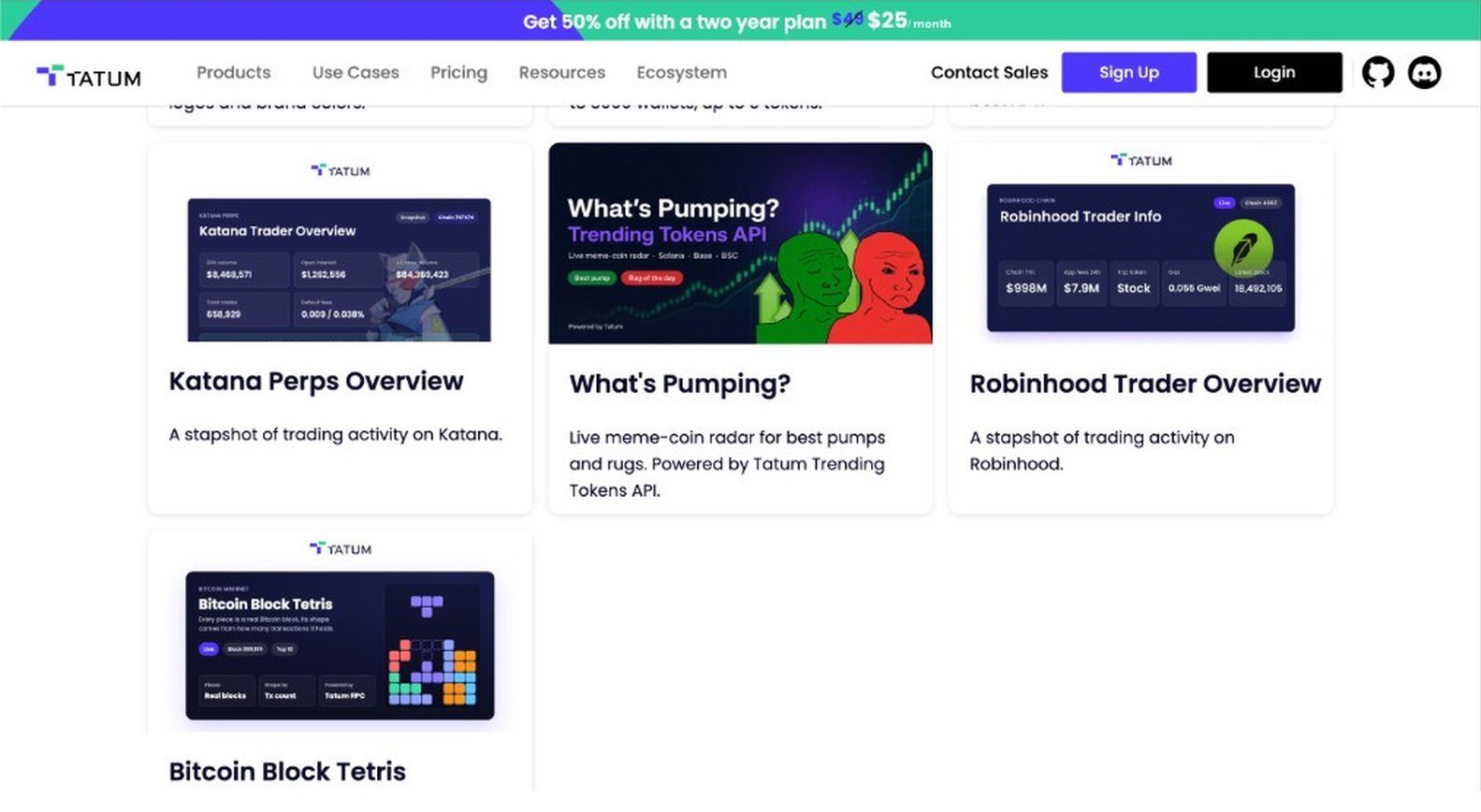
Four of the running apps are the technical ones, and the playful ones:
- Katana Perps Overview is a snapshot of trading activity on Katana: open interest, volume, and who is moving size.
- What's Pumping? is a live meme-coin radar for pumps and rugs, powered by the Tatum Trending Tokens API.
- Robinhood Trader Overview is the same kind of snapshot for trading activity on Robinhood Chain.
- Bitcoin Block Tetris stacks live Bitcoin blocks. Each piece is shaped by that block's transaction count.
The gallery has the rest of the set too:
- Wallet Safety Checker tells you if a wallet has been tied to a known scam.
- Satoshi Wallet Tracker follows transfers in and out of the known Satoshi wallets.
- Agent Pact stores agreements between agents on Walrus.
- Crypto Insider keeps the news down to what you actually need.
- Blockchain Logos finds the logo and brand colors for a chain.
- Wallet Match finds wallets holding the same token.
- Private Mempool Explorer shows Tatum's private mempool transaction details.
- Charity Wallet Tracker follows known charity and NGO crypto wallets.
- Best Solana Staking Pools lists Solana stake pools by APY.
Steal the shape. Your version is the prompt above.
If the app should live in a repo you already have, give Claude Code or Cursor the Tatum integration skill:
npx skills add https://github.com/tatumio/tatum-integration-skill --skill tatumThen:
/tatum add balance checking for EthereumThe skill detects the framework, adds the route, and wires TATUM_API_KEY from the environment. It targets current v4 endpoints. Codex skips that slash command: once the MCP server is connected, you ask for the same balance check in plain language and it calls the tool.
Stay on the read side
These tools are for inspection. The safety notes are short and worth pinning to the prompt: query before you act, check the address format for the chain, and do not put private keys or API keys into the model context.
gateway_execute_rpc will send whatever method you name. Your prompt should forbid eth_sendRawTransaction and anything else that broadcasts. A research run that signs is no longer research.
When the agent should act on what it found, that is a different stack: a wallet, a signer, and a human confirm. Smart Wallets cover the key side. Blockchain infrastructure for AI agents covers how the data layer holds up once the agent is doing this all day.
FAQ
Click a question to open the answer.
Run claude mcp add with your TATUM_API_KEY, then restart and approve the server in /mcp. For a repo you can commit, put the JSON in .mcp.json at the project root. Claude Code does not load a file stored at .claude/mcp.json.
Save the same mcpServers JSON as .cursor/mcp.json in the project, or as ~/.cursor/mcp.json for every project. Open Settings, then MCP, and enable tatumio. Restart Cursor if the tool list stays empty.
Codex uses TOML, not JSON. Run codex mcp add tatumio with the API key, or edit ~/.codex/config.toml under [mcp_servers.tatumio]. The CLI, the IDE extension, and the ChatGPT desktop app share that file. Check it with /mcp or codex mcp list.
No. One Tatum API key works in all three. Keep it in TATUM_API_KEY. Do not paste it into the chat.
The research tools are read APIs. gateway_execute_rpc will pass through any method you name, including ones that broadcast, so the prompt should forbid sending transactions. Signing belongs in a wallet, with a person confirming it.
MCP is how Codex, Claude Code, or Cursor call live chain data while you chat. The AI Builder turns a prompt into an app. The mini apps (What's Pumping, Katana perps, Bitcoin Block Tetris) are examples of that second path.
Start with a better question
Install the MCP server, point Codex, Claude Code, or Cursor at it, and ask for a block number. Mainnet answers in a few seconds.
Explorers are still there when you want to look. The reading can be the agent's job. Deciding what to ask is still yours.