

The short version
Tatum Smart Wallets give each of your users a multi-chain wallet without you ever holding a full private key. Signing uses MPC: one share lives with you (or the user), the other stays sealed in Tatum’s enclave. Both are required. Neither side can move funds alone.
In practice you install @tatumio/wallet-sdk, create a client per user, call generateWallet(), encrypt the shares, back them up, then send with sendAssets(). Same Tatum API key you already use for the RPC Gateway and Data API. Gas sponsorship is there if you want users to act before they hold native tokens.
This page is the forwardable walkthrough. Deep API detail lives in the Smart Wallets docs.
What are Tatum Smart Wallets?
Most wallet products force a choice: browser extension, seed phrase UX, or keys parked on your servers. Smart Wallets sit in a different spot. They are Tatum’s MPC wallet service for apps that create wallets for many end users (fintech, consumer apps, trading, gaming, agents, banking-style flows).
Each wallet is split into two shares:
- Client share: returned once by
generateWallet(). You encrypt it and store it. - Tatum share: sealed in an AWS Nitro Enclave. It never shows up in the SDK.
Normal signing never rebuilds the private key. The two parties just produce a signature together. That is why you can run wallet ops from a backend without treating a raw key like a database column.
Balances and history for those addresses still come from the usual stack: hit a node through the Gateway, or pull portfolios with the Data API. Smart Wallets handle the key and signing side.
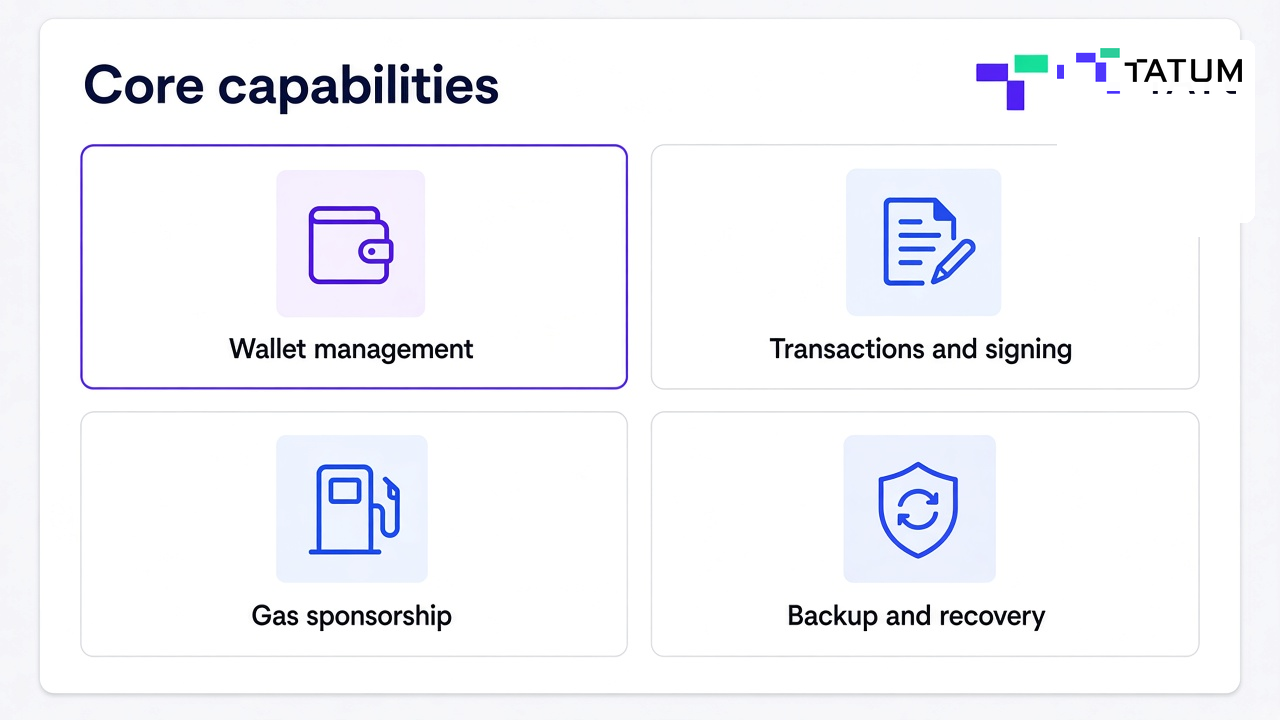
Core capabilities
Tap a card for the short version of each piece

How MPC signing works (2-of-2)
Tatum uses a fixed 2-of-2 model. There is no 2-of-3 or 3-of-5 knob. That keeps the story simple: your share plus Tatum’s share, or no signature.
| Share | Who holds it | What it does |
|---|---|---|
| Client share | Your app or end user | Shown once from generateWallet(). Encrypt it. Tatum cannot recover it for you. |
| Tatum share | AWS Nitro Enclave | Never leaves the enclave. Tatum cannot rebuild the full key on its own. |
One generateWallet() call covers two curves: SECP256K1 for EVM, Bitcoin, and Tron; ED25519 for Solana and Stellar. You pick the share by curve, not by chain name.
If you want a longer take on custody models, we already wrote about custodial vs non-custodial vs hybrid and wallet as a service.
Before you start
- Grab an API key from the Tatum dashboard.
- Node.js 18+, then:
npm install @tatumio/wallet-sdkexport TATUM_API_KEY="your-api-key"The same API key covers Smart Wallets, Gateway RPC, and Data API. No second key. Sepolia and Base Sepolia are fine for dry runs. Operations still burn credits, so keep an eye on the balance in the dashboard.
- Banks and regulated stacks: Smart Wallets for Banks
- Consumer wallet apps: Smart Wallets for Wallet App
- Broader secure flow patterns: Building Secure User Wallet Flows
Step by step: create a wallet and send
Your backend is the custodian. Each end user is a client. Generate, sign, backup, and recover all go through the client-scoped SDK. Keep the permanent API key and clientApiKey on the server. Browser and mobile only get short-lived session tokens if you need them.
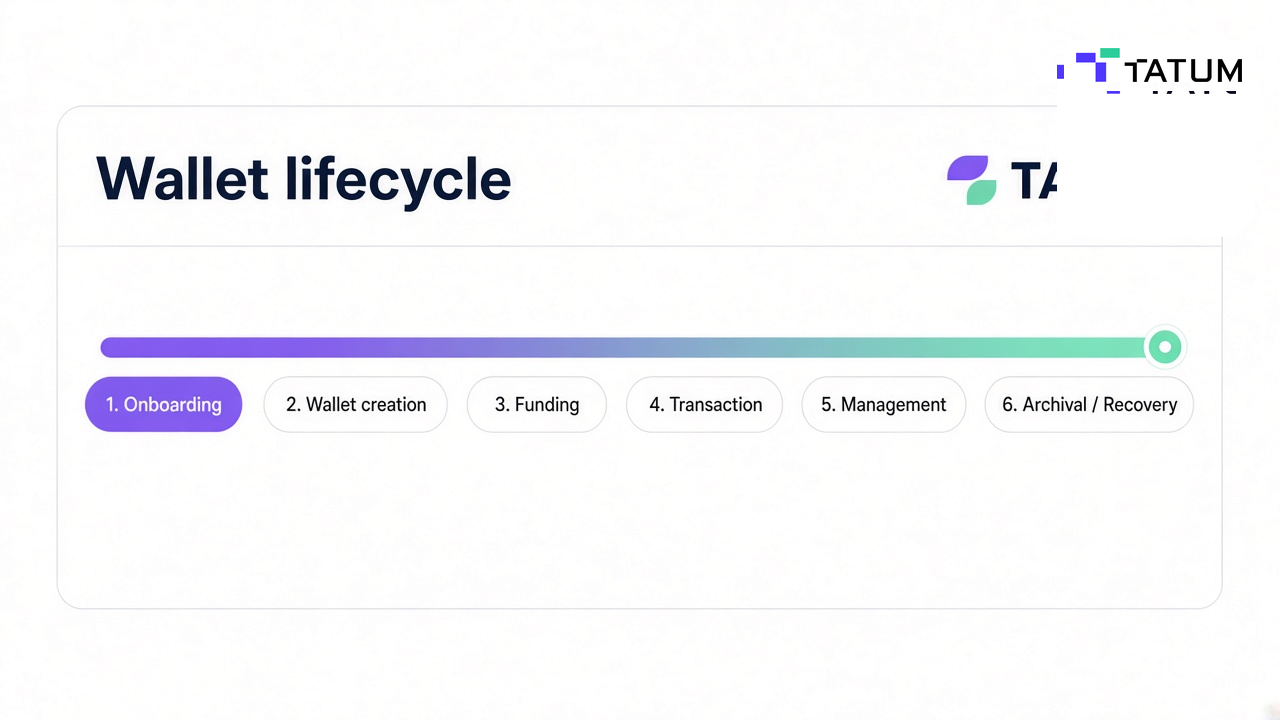
Interactive onboarding
Walk the wallet lifecycle
Working TypeScript example
Run this from a backend service. After the send lands, you can watch the address with Notifications or refresh balances through the Data API.
import { TatumWalletsSdk, WalletChain, WALLET_CHAINS } from "@tatumio/wallet-sdk";

const apiKey = process.env.TATUM_API_KEY;
if (!apiKey) throw new Error("Set TATUM_API_KEY");

const wallets = new TatumWalletsSdk({
  apiKey,
  baseUrl: "https://api.tatum.io",
});

async function onboardAndSend() {
  const newClient = await wallets.custodian.createClient({
    body: { isAccountAbstracted: false },
  });

  const client = wallets.initClient({
    token: newClient.clientApiKey!,
  });

  // Encrypt and store these shares in production
  const shares = await client.generateWallet();

  const details = await client.getClientDetails();
  const signingSharePairIds = details.wallets!.flatMap((w) =>
    (w.signingSharePairs ?? []).map((sp) => sp.id!)
  );
  await client.updateSigningSharePairs({
    body: { signingSharePairIds, status: "STORED_CLIENT" },
  });

  const evmAddress = details.metadata?.namespaces?.["eip155"]?.address;
  console.log("EVM address:", evmAddress);

  const chain = WalletChain.ETHEREUM_SEPOLIA;
  const curve = WALLET_CHAINS[chain].curve;

  const result = await client.sendAssets({
    body: {
      share: shares[curve].share,
      chain,
      to: "0xRecipientAddress",
      token: "NATIVE",
      amount: "0.01",
    },
  });

  console.log("Tx hash:", result.transactionHash);
}

onboardAndSend().catch(console.error);
In production: encrypt shares, create the backup in the same onboarding session, attach the tx hash to your activity feed, and put auth plus policy checks in front of every sendAssets or sign call. If you screen destinations, pair that with malicious address checks before you sign.
Picking the right send or sign call
Most teams live in sendAssets(). The other methods show up when you need inspection, message signing, or a raw digest. Use the rows below instead of guessing from the docs index.
Click a row. The recommended call shows up underneath.
| Simple transfer | Native coin or token to an address |
| Inspect first | Custom flows, simulation, approval gates |
| Sign a message | Login, permits, typed data |
| Raw digest | Custom protocols without broadcast |
sendAssets(). It builds, signs, and broadcasts in one shot for native coins and tokens (ETH, MATIC, SOL, ERC-20, SPL, and friends).ERC-20 and SPL transfers
Pass the contract or mint address as token instead of "NATIVE". For fee context on EVM, you can still lean on fee estimation in the product UI even when sponsorship covers the gas.
// ERC-20 USDC on Ethereum
await client.sendAssets({
  body: {
    share: shares.SECP256K1.share,
    chain: WalletChain.ETHEREUM_MAINNET,
    to: "0xRecipient",
    token: "0xA0b86991c6218b36c1d19D4a2e9Eb0cE3606eB48",
    amount: "100",
  },
});

// SPL USDC on Solana
await client.sendAssets({
  body: {
    share: shares.ED25519.share,
    chain: WalletChain.SOLANA_MAINNET,
    to: "SolanaRecipient",
    token: "EPjFWdd5AufqSSqeM2qN1xzybapC8G4wEGGkZwyTDt1v",
    amount: "100",
  },
});
Gas sponsorship
Turn on sponsorGas: true and Tatum’s relayer pays gas on EVM chains. The user still signs. They just do not need native tokens in the wallet first. That is the difference between “download MetaMask and buy ETH” and “tap send inside your app.”
await client.sendAssets({
  body: {
    share: shares.SECP256K1.share,
    chain: WalletChain.POLYGON_MAINNET,
    to: "0xRecipient",
    token: "0xUSDCContractAddress",
    amount: "10",
    sponsorGas: true,
  },
});
Good fit for first-time onboarding and token-only balances. For very chatty flows, ask support about pre-signatures to cut MPC latency.
Supported chains
Filter by mainnet, testnet, or curve. At runtime, pass the share for WALLET_CHAINS[chain].curve. Some chains need an explicit rpcUrl; others resolve through Tatum RPC automatically via your Gateway key.
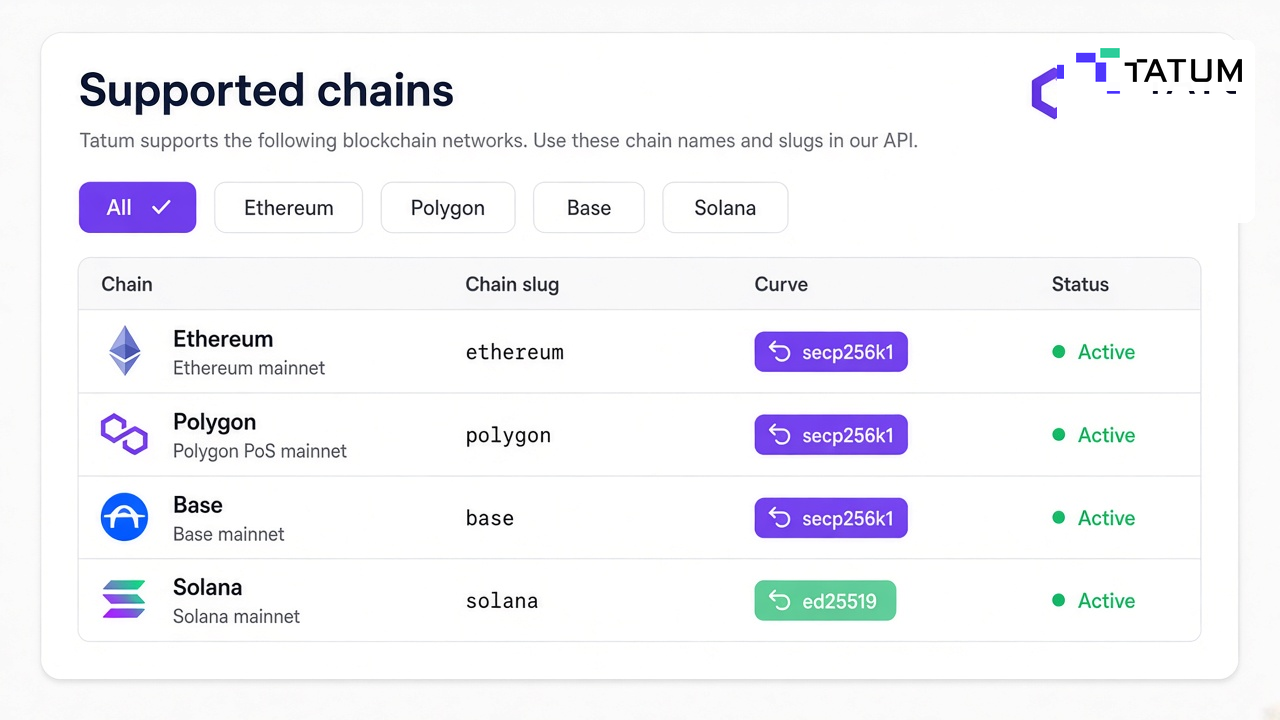
Supported networks
Filter by network or curve
| Chain | WalletChain | Curve | Type |
|---|
Full matrix: Supported Chains. Chain-specific build guides (for example Polygon or Ethereum) still apply once you have an address to fund.
Backup, recovery, and key eject
Backup shares are not signing shares. Day-to-day signing still uses the active pair. Recovery builds a new signing pair from the backups. If the client signing share and the client backup are both gone, that wallet is not coming back.
| Backup | Recovery | |
|---|---|---|
| When | Right after generateWallet() |
When signing shares are lost |
| SDK call | backupWallet() |
recoverWallet() |
| Input | Original generate response | Decrypted backup shares |
| Output | Encrypted backup shares to store | New signing shares to store |
const backup = await client.backupWallet({
  body: { generateResponse: JSON.stringify(shares) },
});

// Encrypt backup.SECP256K1.share and backup.ED25519.share, then store.
// Optional: store ciphertext with Portal via storeEncryptedBackupShare().

await client.updateBackupSharePairs({
  body: {
    backupSharePairIds: [backup.SECP256K1.id, backup.ED25519.id],
    status: "STORED_CLIENT_BACKUP_SHARE",
  },
});
Key eject rebuilds a normal blockchain private key so someone can leave Tatum’s signing path. Call enableEject() first. You need the client backup plus Tatum’s custodian backup inside the ejectableUntil window. The result imports into a regular external wallet.
Where each secret lives
This is the bit teams usually under-document. Click a row for the storage note. Treat every one of these as a secret, not a log field.
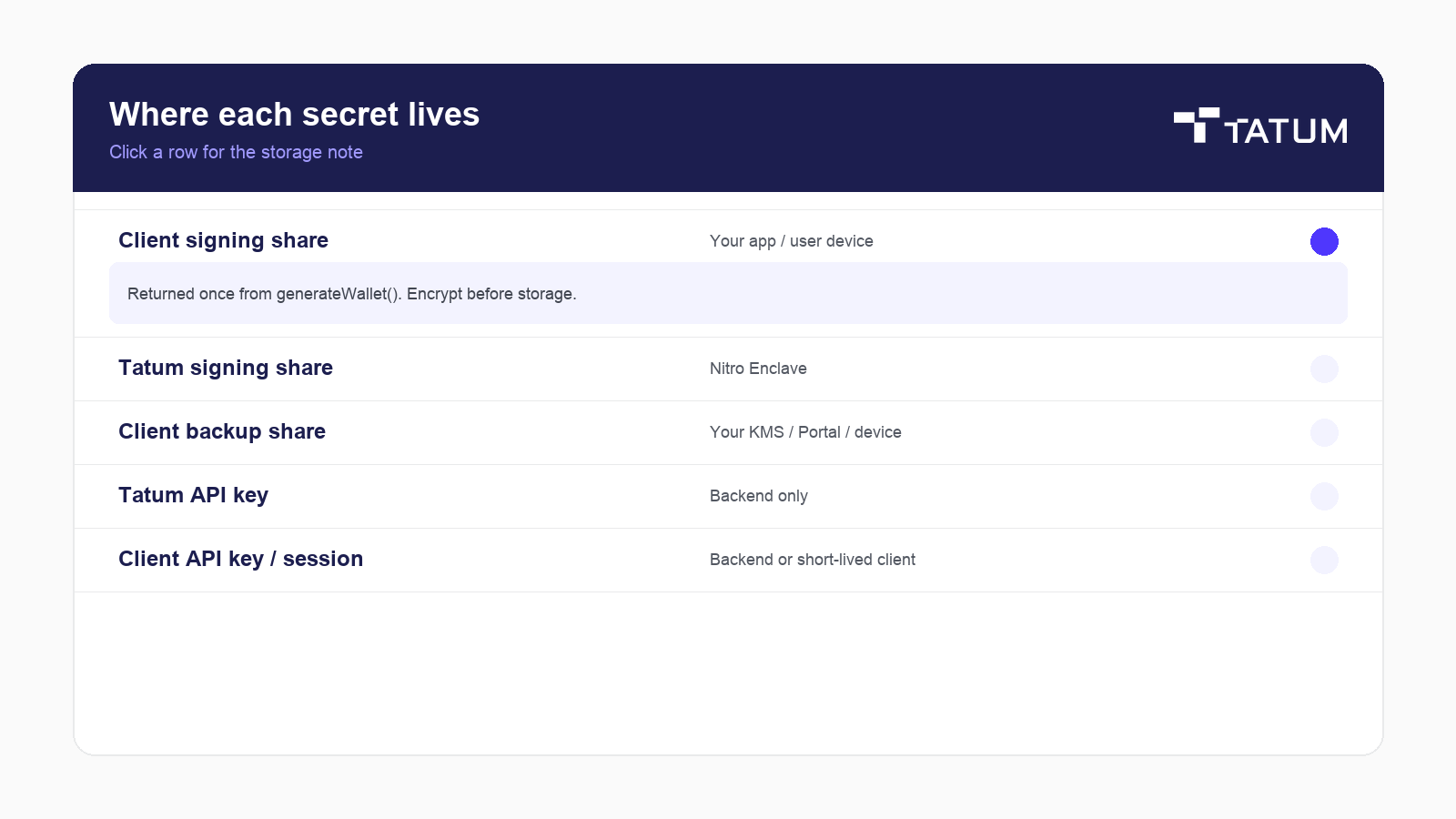

Returned once from generateWallet(). Encrypt before storage. Passed into every sendAssets / sign call. If this and the client backup are both lost, the wallet is unrecoverable.
Never exposed through the SDK. Lives in a hardware-backed enclave. Needed for day-to-day MPC signing alongside the client share.
From backupWallet(). Cannot sign directly. Used only for recovery (and key eject). Encrypt with a key the user or your ops policy controls.
Powers custodian calls, Gateway RPC, and Data API. Environment variable or secrets manager. Never ship it to a browser bundle.
Permanent clientApiKey stays server-side. Use session tokens when the frontend must call client-scoped methods. Do not reuse a session token for custodian endpoints.
Common errors
| Status | Usually means | What to try |
|---|---|---|
401 |
Bad or missing API key | Check apiKey on TatumWalletsSdk |
403 |
Token used in the wrong place | Do not hit custodian endpoints with a session token |
404 |
Unknown client or wallet | Confirm IDs and that staging IDs are not hitting production |
422 |
Wrong share, chain, or funds | Match curve to chain, use WalletChain, or enable sponsorGas |
Catch WalletsApiError for HTTP failures and plain TypeError when the network never answers. Longer patterns: Error Handling.
Security checklist
- Keep the Tatum API key and permanent
clientApiKeyon the backend. - Encrypt signing and backup shares before they touch disk (AES-256-GCM or KMS).
- Require real auth before send, recover, or eject.
- Run limits, destination checks, and approvals before signing.
- Never log shares, backup material, or session tokens.
- If you plan to leave Tatum someday, practice key eject before you need it under pressure.
Smart Wallets FAQ
Answers stay closed until you open a question.
Tatum’s MPC wallet service for end-user wallets. You create and manage them with the Wallet SDK and /v4/wallets API without handling raw private keys. Product page: tatum.io/wallets.
No. Tatum never holds the client share, and its own share stays in a hardware-backed enclave. It joins the MPC protocol. It cannot rebuild the full key alone.
No hard caps on wallets, signing ops, or transactions. Ops burn Tatum credits, so keep enough balance for the volume you run.
Standard MPC signing needs both shares, so signing pauses without Tatum. Key eject lets you rebuild a full private key and keep going on your own.
Start with the overview, then the SDK, wallet management, transactions, gas sponsorship, backup and recovery, and FAQs.
Next steps
- Get an API key from the Tatum dashboard.
- Install
@tatumio/wallet-sdkand run the onboarding flow on a testnet. - Back up in the same session as
generateWallet(). - Put
sendAssets/sponsorGasbehind your auth and policy layer. - Keep the docs and this page handy for the next person who asks how Smart Wallets work.
Package: @tatumio/wallet-sdk · Source: tatumio/wallet-sdk
%20(66).jpg)
%20(52).jpg)